
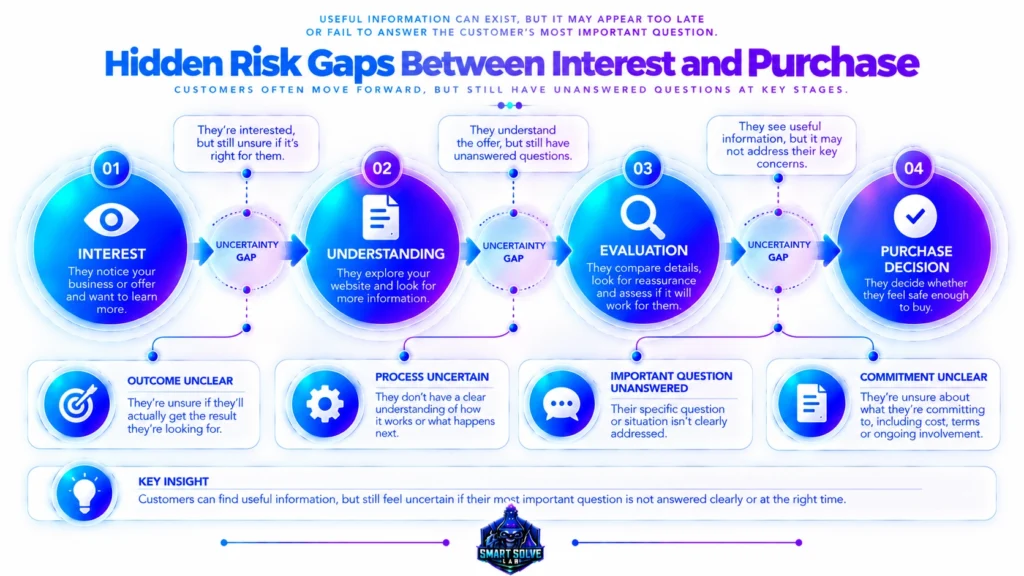
Why Customers Don’t Trust Your Website :
You’re getting visitors to your website. People are clicking, reading your content, and exploring your pages. Yet many visitors leave without contacting you, requesting more information, or taking the next step.
This can be frustrating, especially when you have already invested time in your website, content, design, and marketing.
It raises an important question: why don’t customers trust your website, even when it looks professional?
The answer is not always poor design, weak content, or a lack of traffic. Sometimes, the difficulty lies in how visitors experience the website as a whole. They may struggle to understand the offer, find the information they need, verify a claim, or feel confident about what will happen next.
Website trust is not created by one visual element or a single testimonial. It can be influenced by several connected factors, including clarity, consistency, credibility, transparency, and usability.
In this article, we’ll explore why these factors matter, how visitors may evaluate a website, and how to recognize potential gaps in the digital trust experience.
Table of Contents
Why Your Website Gets Visitors but Still Feels Untrustworthy

-
Why Customers Don’t Feel Safe Enough to Buy From Your Website
Why Customers Don’t Feel Safe Enough to Buy : A customer visits your website, understands your offer, and sees value in what you provide. Your business may even appear credible and professional. Yet, when it is time to make a purchase, the customer hesitates or leaves without buying. Why does this happen? The answer may…
-
Why Revenue Growth Feels So Difficult (And Why More Marketing Doesn’t Always Fix It)
Revenue growth can feel difficult even when a business is busy. Marketing campaigns may be running. Demand may be increasing. Leads may be coming in. Sales conversations may be happening. Customers may be buying, and existing customers may still be engaging with the business. Yet the overall revenue picture can remain harder to understand than…
-
Why Your Business Growth Stalls Even When Every Revenue Activity Is Working
Your revenue activities may be working individually while business growth remains difficult to sustain. Learn how disconnected conditions and weak relationships can affect the wider revenue architecture.
A website can attract visitors without giving them enough confidence to continue. Traffic tells you that people have arrived; it does not, by itself, explain what they think of your business or why they decide to leave.
For example, a visitor might arrive through a helpful blog post but struggle to understand what the business actually offers. Another visitor might understand the offer but be unable to find pricing information, contact details, delivery conditions, or evidence supporting the business’s claims.
These situations create different problems, even if the final outcome looks the same in your analytics: the visitor does not take the expected next step.
Before changing your design or publishing more content, consider what the visitor can actually understand from the existing experience:
- Purpose: Is it clear what the business offers and who it serves?
- Relevance: Does the page address the question or need that brought the visitor there?
- Transparency: Can visitors find important information about the offer, process, policies, or business?
- Usability: Can visitors navigate the site and find the next relevant page without unnecessary difficulty?
- Credibility: Are claims supported by appropriate, genuine evidence?
These questions help distinguish a traffic problem from a possible trust or decision-confidence problem. If visitors are arriving but not taking the next step, the wider context in why high website traffic may still fail to generate revenue can help you understand why traffic alone does not explain business outcomes.
The Real Reason Customers May Not Trust Your Website
Website owners often respond to disappointing results by improving individual elements. They redesign a page, change a headline, publish more articles, add testimonials, or adjust a call to action.
Any of these changes may be useful when it addresses a genuine problem. However, changing individual elements without understanding the underlying issue can make it difficult to determine what actually needs attention.
Consider a website with a polished design but vague service descriptions. Visitors may appreciate the appearance but still not understand what they would receive. Or imagine a page that makes strong claims but provides little supporting evidence. The message may be persuasive in tone without giving visitors enough information to evaluate it.
The issue in these examples is not necessarily the absence of effort. It is a mismatch between what the website communicates and what visitors need to understand before proceeding.
Look at the relationship between the page’s promise, its supporting information, the evidence it provides, and the action it asks visitors to take. If those elements do not work together, the experience may feel confusing or incomplete.
For a broader perspective on how disconnected digital activities can affect performance, read why your digital marketing may not be working as expected.
Digital Trust Is Not a Feature — It’s a System

Trust is sometimes treated as something a website can add through a badge, a testimonial, a professional layout, or a security symbol. These elements can provide useful signals, but none of them automatically establishes trust on its own.
Visitors experience a website as a connected journey. They encounter a message, explore the information, assess whether it is relevant, look for supporting evidence, and decide whether the next step feels appropriate.
That journey may involve several connected elements:
- Content: Does the information answer the visitor’s questions clearly?
- Structure: Are pages organised in a way that helps visitors understand the business?
- Credibility: Are important claims supported by accurate and relevant evidence?
- Consistency: Do the page, offer, business details, and next steps communicate a coherent message?
- User experience: Can visitors navigate the website and complete relevant tasks without avoidable friction?
These elements are related, but they are not interchangeable. A technically secure website can still be confusing. A well-written page can still leave important questions unanswered. A professional design can still present claims that visitors cannot verify.
For this reason, it is useful to examine trust as a system of connected signals rather than assuming that one improvement will resolve every concern.
The Digital Trust System: How Trust Builds in Stages
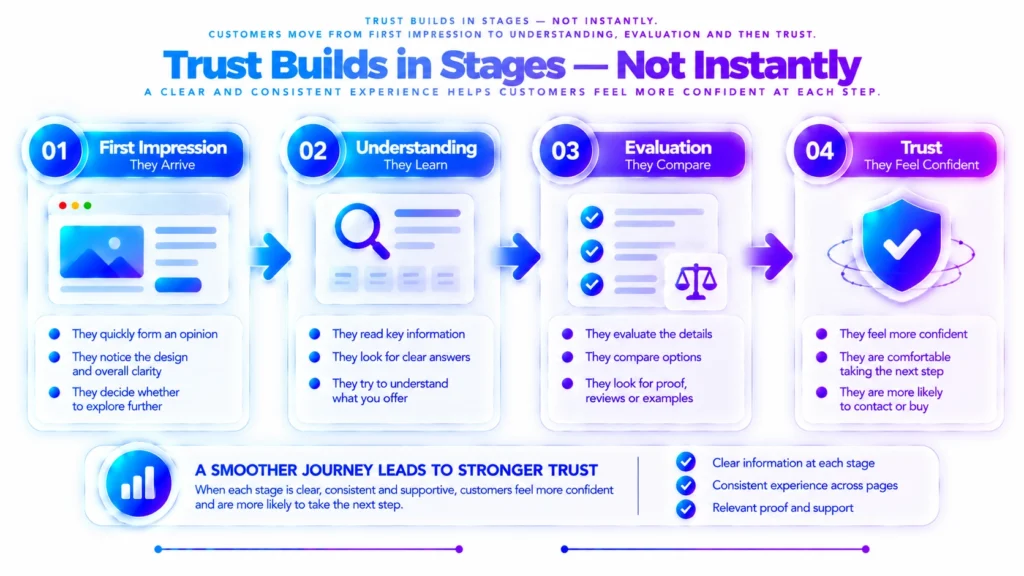
Visitors do not necessarily evaluate every part of a website in the same order. Their questions depend on the page they visit, their familiarity with the business, the type of offer, and the commitment being requested.
However, a useful way to understand the journey is to consider four broad stages.
1. First Impression
Visitors begin forming an impression from the page they land on. The layout, wording, navigation, and visible business information may influence whether the site feels relevant and understandable.
A first impression is only an initial signal, not proof that a business is trustworthy or untrustworthy. Visitors may continue exploring even when the design is simple, provided the information they need is clear and relevant.
2. Understanding
Next, visitors need to understand what the business offers, who the offer is for, and why it may be relevant to them.
Unclear terminology, vague descriptions, or missing context can make this difficult. When visitors have to guess what a service includes or what a product is intended to do, they may delay their decision or look elsewhere for clarification.
3. Evaluation
Visitors may then look for information that helps them assess the business and its offer. Depending on the situation, they may check examples, reviews, policies, credentials, contact details, pricing, or other relevant evidence.
The appropriate evidence depends on the claims being made. Genuine, specific, relevant information is more useful than unsupported superlatives or generic assurances.
4. Trust Decision
After reviewing the information available to them, visitors decide whether they feel comfortable continuing. Some will take the next step; others may need more information, compare alternatives, or decide the offer is not right for them.
Not every departure indicates a trust problem. Visitors may leave because of price, timing, lack of need, or other factors. The aim is to understand whether the website is creating avoidable uncertainty—not to assume that every visitor should convert.
The Three Layers to Examine in Website Trust
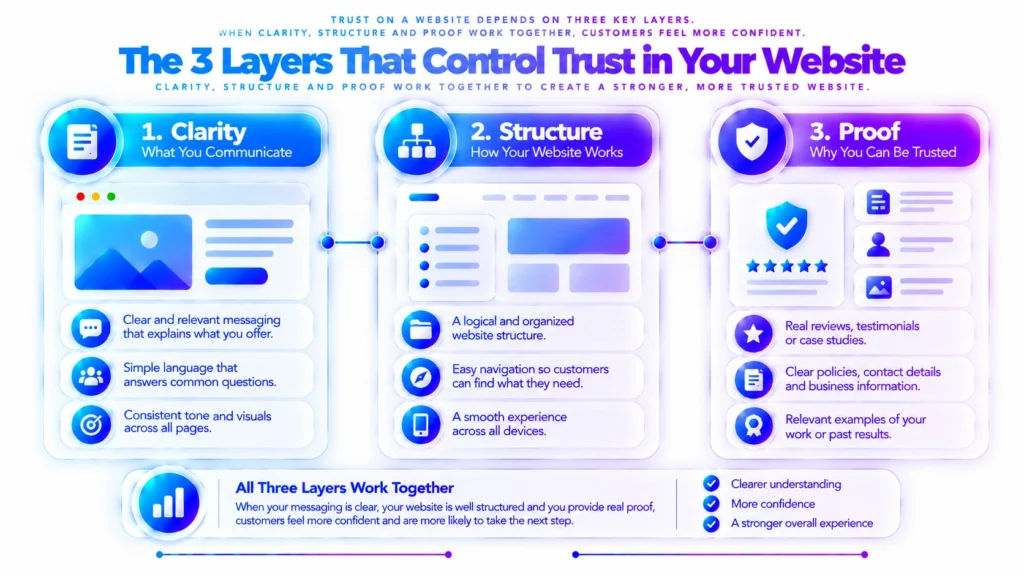
The visitor journey becomes easier to understand when you examine three connected dimensions: clarity, structure, and proof. These are useful diagnostic lenses, not a guarantee that every visitor will trust or buy from a website.
Layer 1 — Clarity: Can Visitors Understand You?
Clarity concerns how easily visitors can understand your business, offer, and information.
Ask whether a new visitor can identify what you provide, who it helps, and what makes the offer relevant. Consider whether important terms are explained and whether the page answers the questions a visitor is likely to have at that stage.
If visitors must interpret vague statements or search several unrelated pages to understand a basic offer, the problem may be information clarity rather than website appearance.
Layer 2 — Structure: Can Visitors Find Their Way?
Structure concerns how information is organised and how one page or action connects to another.
Navigation, headings, internal links, page hierarchy, and calls to action can help visitors understand where they are and what they can explore next. A clear structure also makes it easier to move from general information to more specific answers.
When important information is scattered or related pages are difficult to find, visitors may struggle to build a complete understanding of the business.
Layer 3 — Proof: Can Visitors Evaluate Your Claims?
Proof concerns the evidence available to support the statements a business makes.
Depending on the business, relevant evidence may include genuine customer feedback, accurate business details, examples of previous work, clear policies, qualifications, demonstrations, or specific explanations of how an offer works.
Evidence should be authentic, current where necessary, and relevant to the claim it supports. A testimonial does not prove every claim, and a badge or logo should not be used to imply an endorsement that does not exist.
When clarity, structure, and proof support one another, visitors have a better opportunity to understand and evaluate the offer.
Why Many Businesses Struggle to Build Trust Online

Several recurring patterns can make a website harder to evaluate. Identifying them can help you investigate the actual source of uncertainty instead of repeatedly changing unrelated elements.
Mistake 1 — Treating Trust as a Design Problem
A professional design can support a positive experience, but appearance alone cannot explain an offer, substantiate a claim, or answer a visitor’s questions.
If the website looks polished but its message is vague or its important information is difficult to find, further visual changes may not address the main issue.
Mistake 2 — Publishing Content Without Clear Connections
Publishing helpful articles and pages can give visitors valuable information. However, related content is more useful when readers can understand how it connects to the wider subject and where to find relevant next steps.
Internal links should help readers explore genuinely related information. They should not be added merely to increase the number of links on a page.
Mistake 3 — Asking for Action Before Answering Important Questions
A call to action may be appropriate, but visitors may hesitate if the page has not explained what happens next, what the offer includes, or what commitment is required.
The appropriate next step depends on the visitor’s needs and readiness. Sometimes that means contacting the business; in other cases, it means reading a more detailed explanation or reviewing the relevant terms first.
Mistake 4 — Making Changes Without Identifying the Problem
When performance disappoints, it is tempting to change headlines, colours, layouts, and calls to action all at once. This can make it harder to understand which issue mattered and whether a change helped.
A more useful starting point is to identify the specific uncertainty or friction a visitor may encounter. Then review the relevant evidence, page content, and journey before deciding what needs to change.
Mistake 5 — Making Claims Without Sufficient Evidence
Statements such as “the best solution,” “fully reliable,” or “guaranteed results” may sound persuasive, but strong claims need appropriate support. If a claim cannot be substantiated, it can undermine credibility rather than strengthen it.
Accurate descriptions, transparent conditions, and relevant evidence give visitors a more useful basis for evaluation.
The Shift From Random Fixes to a Connected Digital Trust System

The goal is not to change every part of a website at once. It is to understand how the existing parts relate and where a visitor may encounter an avoidable gap.
For example, if a service page attracts relevant visitors but receives few enquiries, several explanations are possible. The offer may not match the visitors’ needs. The page may leave essential questions unanswered. The next step may be unclear. Or the enquiry process may be difficult to complete.
These possibilities call for different investigations. Traffic and conversion data can help describe the pattern, while page reviews and visitor feedback may provide additional context. No single metric proves that a lack of trust is the cause.
What a System-Based View Helps You Notice
- Message alignment: Whether the page delivers what the visitor reasonably expects from the link or search result.
- Information gaps: Whether important questions remain unanswered.
- Evidence gaps: Whether claims have relevant support.
- Journey gaps: Whether visitors can find an appropriate next step.
- Consistency gaps: Whether the information and experience remain coherent across relevant pages.
These are areas to examine, not a universal checklist that guarantees a particular outcome. Which factor matters most will depend on the business, its audience, the offer, and the visitor’s purpose.
Google’s guidance on creating helpful, reliable, people-first content is a useful reference when evaluating whether website content genuinely serves visitors rather than existing only to attract search traffic.
How to Recognise a Possible Website Trust Gap
You do not need to assume that trust is the problem just because visitors leave without buying. Instead, look for patterns that can help you decide what to investigate.
- Visitors misunderstand the offer: Review whether the page explains the service, product, intended audience, and key conditions.
- Visitors repeatedly ask basic questions: Check whether the answers are missing, difficult to locate, or written in unclear language.
- Visitors explore but do not progress: Review the relevance of the page, the information available, and the clarity of the next step.
- Visitors question the business’s claims: Check whether appropriate evidence is visible and whether the wording is accurate.
- Visitors encounter inconsistent details: Compare relevant pages and business information for discrepancies or outdated statements.
Where possible, combine these observations with analytics, customer questions, usability feedback, and other available evidence. A pattern can suggest where to investigate, but it does not automatically establish the cause.
For instance, a low enquiry rate may reflect a trust concern, a mismatch between traffic and the offer, pricing, limited demand, or friction in the enquiry process. Understanding the context helps prevent an incorrect diagnosis.
Conclusion — Trust Is Built, Not Assumed
When customers do not trust a website, the visible symptom may be a short visit, a missed enquiry, or a decision not to buy. The underlying reason, however, is not always obvious from that outcome alone.
Clarity helps visitors understand the offer. Structure helps them navigate information. Relevant proof helps them evaluate claims. Consistency and usability contribute to a more coherent experience.
These elements do not guarantee trust or conversion, but examining how they work together can help website owners identify potential gaps more accurately.
Rather than assuming that the design, content, or traffic is automatically the problem, begin by asking what visitors need to understand, what evidence they need to evaluate, and where the experience may be leaving important questions unanswered.
The key is to understand the trust gap before deciding which part of the website needs attention.

Want to Understand Your Website’s Trust Gaps More Clearly?
If you suspect that visitors are struggling to understand or evaluate your website, the next step is to examine the signals that may be contributing to that uncertainty.
The Digital Trust Diagnostic from Smart Solve Lab is the relevant next step for readers who want a more structured way to understand potential website trust gaps. It is designed around diagnosis and clarity—not a promise that every trust concern can be eliminated or that conversions will automatically increase.
Start by understanding the problem your visitors may be experiencing, then use that understanding to decide what deserves closer attention.
Frequently Asked Questions
1. Why don’t customers trust my website?
Customers may hesitate when a website has unclear messaging, inconsistent information, difficult navigation, limited credibility evidence, or an experience that does not answer their questions. The cause depends on the website and its audience, so it is important to examine the overall visitor experience rather than assume one issue is responsible.
2. Does a professional website design automatically build trust?
No. A professional design can support a positive first impression, but visitors may also look for clear information, consistent branding, accessible contact details, relevant evidence, and a straightforward user journey. Design is one part of the broader trust experience.
3. How does website content affect customer trust?
Content helps visitors understand what a business offers, who it serves, and whether it is relevant to their needs. Vague claims, conflicting details, or unanswered questions can create uncertainty. Clear, specific, and consistent information can help visitors evaluate the business more confidently.
4. Can website navigation problems reduce trust?
Yes. When visitors struggle to find important information, understand page relationships, or identify the next step, the experience may feel confusing. Clear navigation and a logical page structure make it easier for people to explore and evaluate a website.
5. What credibility signals should a business website include?
Depending on the business, useful signals may include accurate contact information, transparent policies, authentic customer reviews, relevant case studies, clear service details, and secure handling of information. Only display evidence that is genuine, current, and appropriate to the claims being made.
6. Why do customers leave a website without making a purchase?
Visitors may leave because the offer does not match their needs, important information is missing, costs are unclear, the buying process feels difficult, or they are not ready to purchase. Low trust can be one possible factor, but visitor behaviour and other evidence should be reviewed before deciding what is causing the problem.
7. How can I identify trust gaps on my website?
Review the website from a visitor’s perspective. Check whether the offer is easy to understand, information is consistent, navigation is clear, credibility claims are supported, and important questions are answered. Analytics, user feedback, usability testing, and a structured website review can help identify areas that need closer investigation.
Recommended Reading
- Why Customers Visit Your Website but Don’t Buy: Understanding the Trust Gap — explore why visitors may hesitate before making a buying decision.
- Why Customers Don’t Feel Safe Enough to Buy From Your Website — understand how perceived risk and unanswered concerns may affect customer decisions.
- High Website Traffic Still Fails to Generate Revenue — examine why attracting visitors does not automatically produce business results.